

How to Create a DMARC Record in DirectAdmin
Create a DMARC TXT record using the DirectAdmin wizard and learn about its domain and subdomain policies, reporting, alignment, and compatibility options.
DMARC lets you tell recipients how to handle messages that use your domain in the visible sender address and fail the required authentication and alignment checks. It also lets you request reports. It is published as a TXT DNS record named _dmarc.
The URL and server name, domain, username, limits, and tools may vary depending on your service. Sign in with your own hosting credentials and always check the selected domain. The screenshots show a reference interface.
1. Check the domain and existing records
Confirm that your domain's authoritative DNS is managed in this DirectAdmin instance. If you use another provider's DNS, saving here does not guarantee that the change will be visible on the Internet.
Check which services send email using your domain. A message can pass DMARC when at least one of SPF or DKIM passes and is aligned with the domain in the visible sender address. Creating this TXT record does not, by itself, enable SPF or DKIM signing.
If a TXT policy already exists at _dmarc, use Edit in that row. Keep a copy of its current value and avoid creating a second policy at the same name.
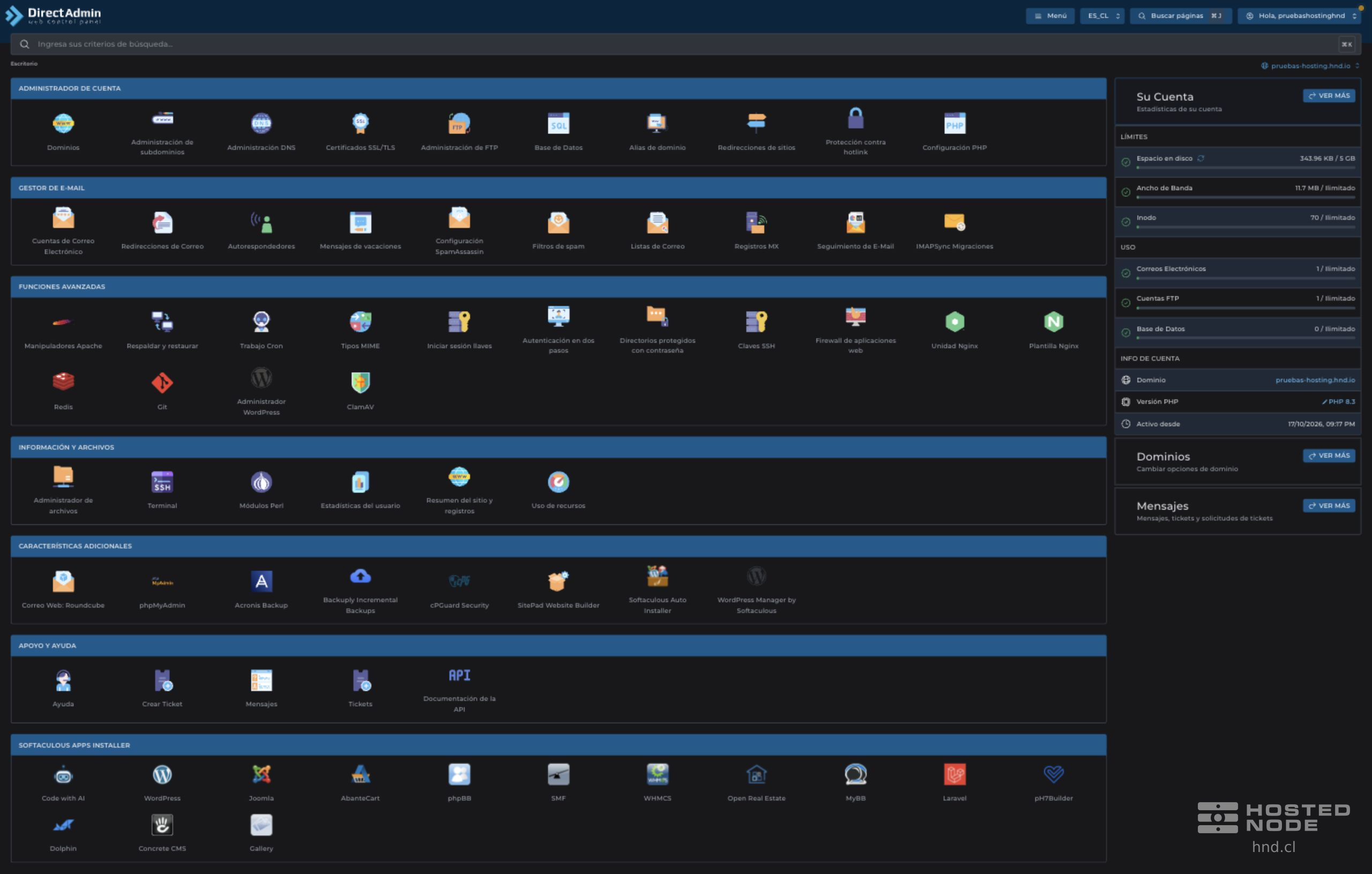
In the full dashboard, open Account Manager → DNS Management. In the table, you can review Name, TTL, Type, and Value.
2. Select TXT and then DMARC

Click Add Record. Under Record Type, choose TXT, and under TXT Record Type, select DMARC. The panel will display the wizard and suggest _dmarc as the name.
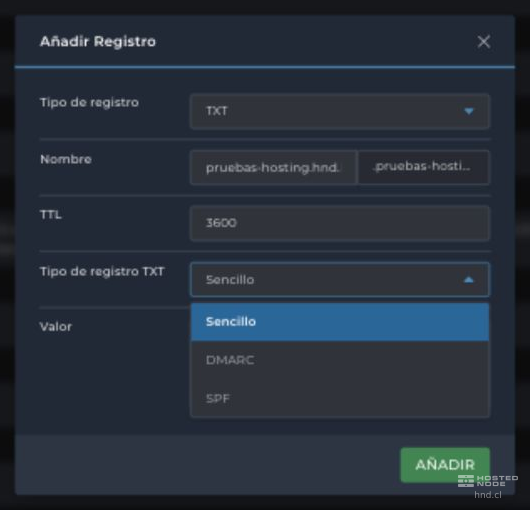
Field | What to enter |
|---|---|
Record Type | TXT. DMARC is the content of the TXT record, not a separate DNS record type. |
Name | _dmarc for the selected domain. The panel's suffix completes the name, for example _dmarc.pruebas-hosting.hnd.io. Do not add that domain again to the relative name. |
TTL | The record's cache duration, in seconds. The form shows 3600, equivalent to one hour. Keep your service's value unless you need a different one; this is not the report interval. |
TXT Record Type | DMARC to use the wizard's fields. |
3. Choose the domain and subdomain policies
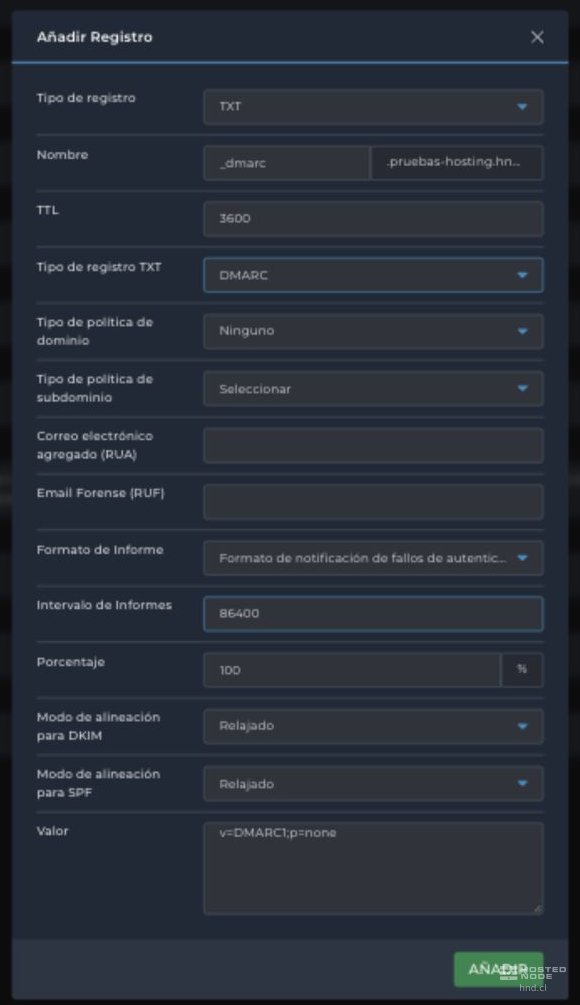
Domain Policy Type corresponds to p. It expresses the handling you request for messages that fail DMARC; the receiver retains the final decision.
Panel option | Value | What it requests |
|---|---|---|
None | p=none | Do not apply quarantine or rejection under this DMARC policy. Useful for monitoring when you also request reports through RUA. It does not disable the recipient's filters. |
Quarantine | p=quarantine | Treat failing messages as suspicious; the receiver may send them to spam or another quarantine. |
Reject | p=reject | Request rejection of failing messages. This can affect legitimate email, including some forwarded messages and mailing lists; evaluate those mail flows before applying it. |
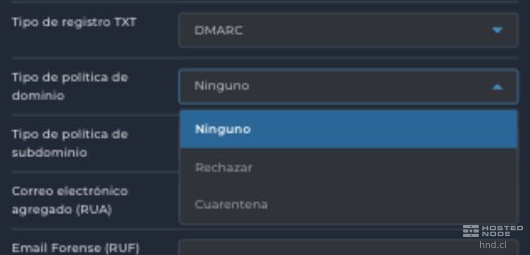
Subdomain Policy Type corresponds to sp. It offers Same as domain, None, Reject, and Quarantine. Same as domain leaves out a separate sp policy; the selector may continue to display Select. The other options generate sp=none, sp=reject, or sp=quarantine. This preference is used for subdomains to which the inherited policy applies; a subdomain can have its own DMARC policy.
4. Specify where to receive reports
Field | Accepted information and effect |
|---|---|
Aggregate Email (RUA) | Address of a mailbox or service that receives authentication summaries. For example, informes@tudominio.cl. Enter the address without mailto:; the wizard adds that prefix in rua. If you leave it empty, the record does not request aggregate reports. |
Forensic Email (RUF) | Address for failure reports on individual messages. For example, fallos@tudominio.cl, without mailto:. This generates ruf=mailto:… and can be left empty if you do not need this information. |
Use only existing mailboxes or authorized destinations: the record does not create email accounts. A destination on another domain may require authorization from that receiver. Check Value to ensure that each address is associated with the appropriate RUA or RUF tag.
Aggregate reports usually contain summaries, IP addresses, and authentication results. Failure reports may contain message data and require particular care when choosing the destination. Whether reports are sent depends on the receiving provider; not all providers issue both types of report.
5. Understand the format, interval, and percentage
Field or option | What it means in the wizard |
|---|---|
Authentication Failure Reporting Format | This is the default Report Format option and corresponds to AFRF. With the default value, the panel may omit rf from Value. It refers to failure reports, not the format of RUA aggregate reports. |
Incident Object Description Exchange Format | The second Report Format option generates rf=iodef. Do not assume that your report receiver or email providers support it; keep the default format unless you have compatible instructions. |
Report Interval | Expressed in seconds: 86400 equals 24 hours and 43200 equals 12 hours. Changing it may add ri, for example ri=43200. It does not schedule a hosting task or guarantee a delivery frequency. |
Percentage | Expressed as an integer between 0 and 100. Changing 100 to 25 generates pct=25. It referred to a proportion of failing messages for which policy enforcement would be requested; it was not a proportion of reports and does not guarantee that only that percentage will be blocked. |
Keep 86400 and 100 if you do not need compatibility with an existing configuration. Do not use a low percentage as a safeguard for tightening a policy without reviewing legitimate email.
6. Define DKIM and SPF alignment
Both selectors offer Relaxed and Strict. Alignment compares domains; it does not compare the part of the address before @.
Selector | Relaxed | Strict |
|---|---|---|
Alignment Mode for DKIM | adkim=r: the d= domain of a valid DKIM signature shares the organizational domain with the visible sender address. | adkim=s: the d= domain in the valid signature exactly matches the visible sender's domain. |
SPF alignment mode | aspf=r: the envelope sender domain used by SPF shares the organizational domain with the visible sender. | aspf=s: both domains match exactly. This does not mean comparing the MX server address with the sender. |
For example, a visible sender usuario@tudominio.cl and an envelope domain envios.tudominio.cl can align in Relaxed mode if SPF passes; they do not match in Strict mode. Relaxed is the panel's default setting and may be omitted from Value. Selecting Strict adds adkim=s or aspf=s, depending on the control.
7. Review Value and save the record
Value shows the string that will be published, with v=DMARC1 at the beginning and tags separated by semicolons. When you change options in the wizard, the string updates. Some default values are omitted; this does not mean there are fields left to complete.
With None selected, the reporting fields empty, and the other options set to their defaults, the panel generates this basic policy:
v=DMARC1;p=noneIf you have a reporting mailbox and enter it in RUA, an example monitoring policy would be:
v=DMARC1;p=none; rua=mailto:informes@tudominio.clReplace the address with your authorized destination. Do not include a password, a private key, or an API key in the TXT record. The Value field can be edited, but changing the selectors afterward may rebuild it: always review the final string before saving.
Check the domain, the _dmarc name, the TTL, and the policy. Click Add for a new record or Save if you edited an existing one. Wait for confirmation from the panel.

8. Check the result
There must be only one DMARC policy at the configured name. Open Edit if you need to read the full value; close without saving if you only want to view it.
Saving confirms the change in this DNS zone. Caches may retain the previous data according to its TTL; the record appearing in the panel does not, by itself, confirm its visibility across the Internet.
If you requested RUA or RUF, wait for the reports issued by recipients. Not receiving them immediately does not indicate an error; p=none without RUA does not request aggregate reports either.
Review the results for your senders before changing the policy. DMARC does not guarantee inbox delivery.