

How to Install and Deploy a Python Application with NGINX Unit in DirectAdmin
Prepare a Python WSGI application, select its version and entry point in NGINX Unit, and check the route. Requires Terminal/SSH.
Nginx Unit runs Python applications from DirectAdmin. This guide uses a simple WSGI application with no additional packages, allowing you to check the entire process before deploying a project with more dependencies.
The control panel address, server name, domain, username, versions, limits, and available tools may vary depending on your service. Use the details in your hosting welcome email.
To open the panel's console and find your way around folders, see How to use the terminal included in DirectAdmin
1. Check Python and prepare the files
Open System Info & Files → Terminal, connect to the console, and run python3 --version. Then check the Python versions offered when creating an application in Nginx Unit. The project's interpreter and the selected module must be compatible; having python3 in Terminal does not guarantee that every version is available in Nginx Unit.
Create a new folder outside public_html. Replace tudominio.example with your account's actual domain:
DOMINIO="tudominio.example"
mkdir "$HOME/domains/$DOMINIO/python-tutorial"
cd "$HOME/domains/$DOMINIO/python-tutorial"
In the File Manager, open that folder, create wsgi.py, and save the following content:
def application(environ, start_response):
    body = 'Aplicacion Python funcionando con Unidad Nginx\n'.encode('utf-8')
    start_response('200 OK', [
        ('Content-Type', 'text/plain; charset=utf-8'),
        ('Content-Length', str(len(body))),
    ])
    return [body]
The file defines application, the WSGI function that Nginx Unit will call to handle each request. This example uses only the Python standard library.
2. Configure the application in the panel
On the dashboard, open Advanced Features → Nginx Unit and click Create Application.

Name: pythontutorial. Use a simple name without spaces or hyphens.
Type: Python.
Version: select the available version that matches your project. The screenshots use Python 3.10; the options may vary depending on your service.
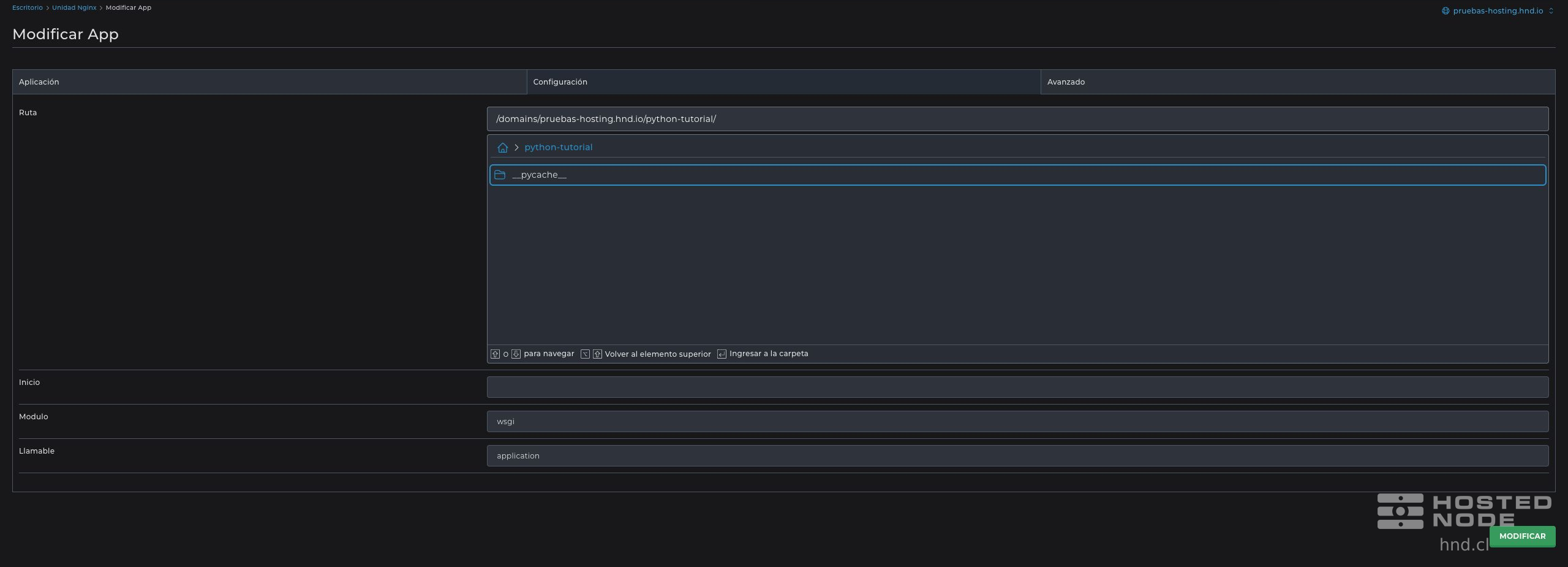
Path: the folder containing wsgi.py, for example /domains/TU_DOMINIO/python-tutorial/ in the panel's selector.
Module: wsgi, without adding .py.
Callable: application, exactly as the function is named in wsgi.py.
Click Create and wait for confirmation. Check that pythontutorial appears in the list with the correct directory. Open its configuration to review Path, Module, and Callable.
If your project requires external packages, first prepare a virtual environment with the same major and minor Python version as the Nginx Unit module. Install the project's dependencies in it and use Home in the application configuration to specify the path to that environment. The example in this article does not need that field. An ASGI application requires its own specific configuration; do not simply rename its file to treat it as WSGI.
3. Link a route to the application
In Nginx Unit, click Create Route, select pythontutorial under Application, and review the JSON tab. To handle only /python-tutorial/, the rule must map that prefix to the application:
[
  {
    "match": {"uri": "/python-tutorial/*"},
    "action": {"pass": "applications/tudominio.example_pythontutorial"}
  }
]
Replace tudominio.example with your domain and use the application identifier suggested by the panel. Keep the existing rules; if there is already a list, add the corresponding entry without deleting the others. Check that match.uri restricts requests to the prefix you want to use.
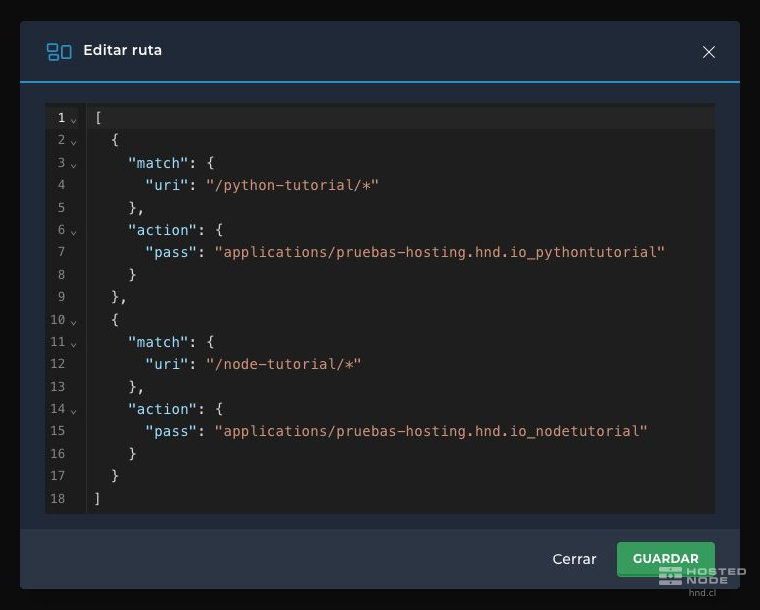
Click Create or Save and wait for the web configuration to take effect. The domain's route should appear under Routes.
4. Verify the deployment
Open your domain's HTTPS address ending in /python-tutorial/. The application in this article responds with:
Aplicacion Python funcionando con Unidad NginxIf you receive a 404, check the domain, URL, and route match. If there is a startup error, check the Python version, folder, module without its extension, function name, and dependencies. An error when saving requires you to first correct the value flagged by the panel.
Nginx Unit manages the application's processes; you can close Terminal after checking the result. If the required Python module is unavailable, contact support to discuss your hosting options.