

How to Create a Password-Protected Directory in DirectAdmin
Select a folder on your site, enable its protection, and create users to require authentication when accessing it over HTTPS.
A protected directory requests a username and password before displaying its content on the web. You can use it to restrict access to a specific folder on your site.
The panel address, server name, domain, username, versions, limits, and available tools may vary depending on your service. Use the details in your hosting welcome email.
1. Locate the folder you want to protect
In File Manager, check that the folder exists within the domain's web directory. For example, area-privada inside domains/TU_DOMINIO/public_html. Identify this path carefully to avoid accidentally protecting the entire site.
2. Enable directory protection

Return to the dashboard and open Advanced Features → Password Protected Directories. In the domain's row, click Add Protected Folder.
Expand public_html in the tree and select only the folder you want to protect. In Directory Authentication Realm, enter a descriptive name, such as Private area; this is the label that identifies the area in the authentication dialog. Click Protect.
3. Add an access user
In View Protected Directory, check the path next to “Viewing protection for”. Under Manage Users, enter the Username and a Password specifically for this access; then click Add User. The user should appear in the table.
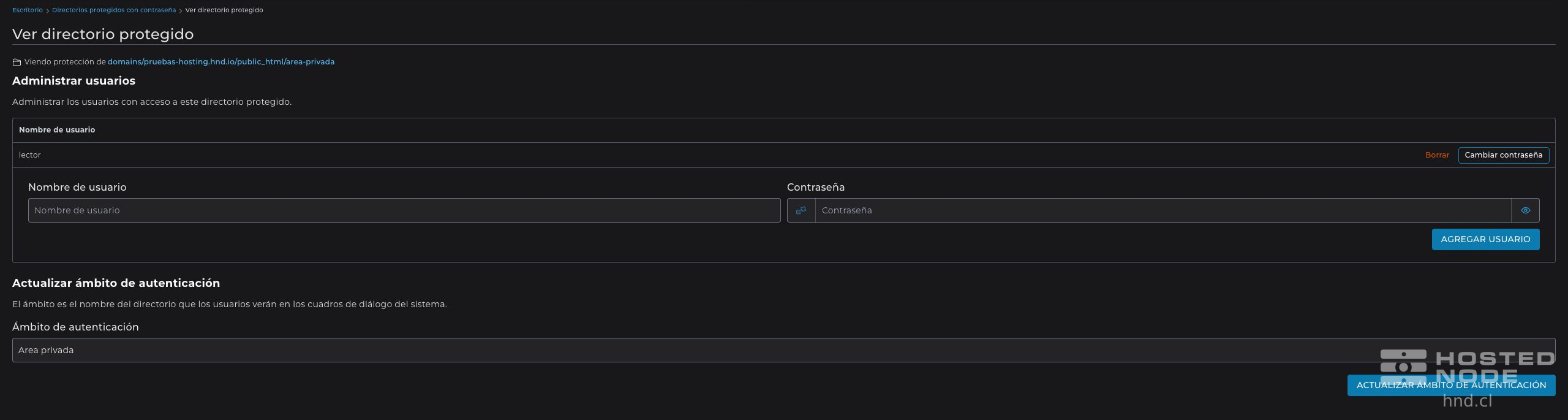
These credentials are for the protected directory. You do not need to share your main hosting username or password. If several people need access, you can create separate users and manage each one from this table.
4. Check the password prompt
Open a private browser window and visit the folder's HTTPS address, for example your domain followed by /area-privada/. The browser should request a username and password. Access should be denied without valid credentials; with the user you created, the permitted content should load.
Use HTTPS to protect credentials during transmission. If the browser already remembers your login, repeat the check in a new private session. If the folder has no index page, successful authentication does not guarantee that the server will allow its contents to be listed.
5. Manage access
Return to Password Protected Directories and open the folder to review its users. For each user, you can use Change Password or Delete depending on the action you need. Update Authentication Realm changes the area's label, not its users' passwords.